
AppGrabbit for students
the lecture to notes, on your PC and with nothing uploaded
Updated: October 2026 · 6 min read
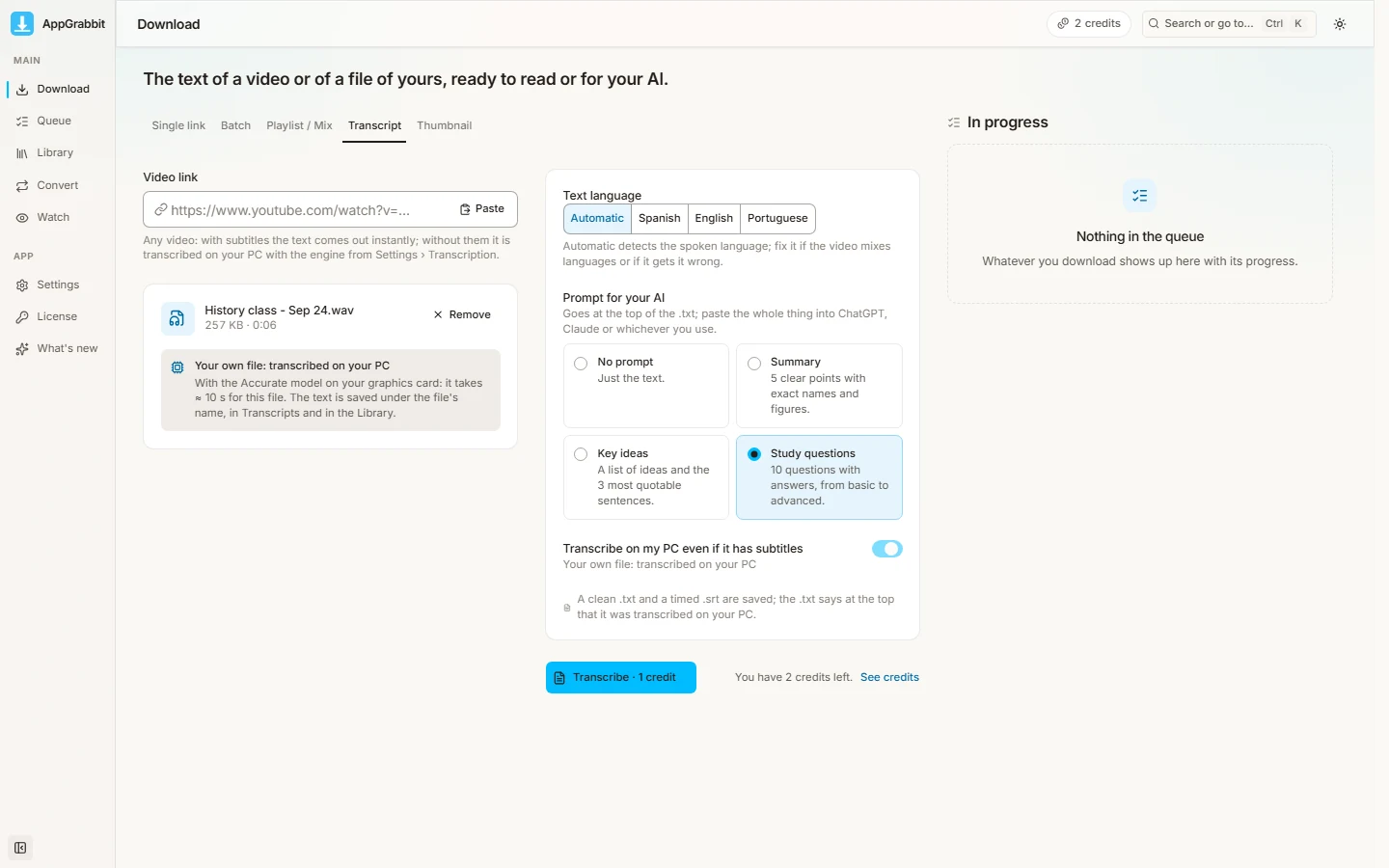
Record the lecture (Zoom, Teams, Meet or your phone) or copy the YouTube link, paste it into AppGrabbit › Transcribe with AI, pick the Study questions prompt and hit Transcribe. You get a .txt with the prompt written on top: paste it into ChatGPT, Gemini or Claude and you have a summary, key ideas or a quiz to practice with. 1 credit per lecture, 5 free a month. It doesn't transcribe live and doesn't take notes for you: it needs the recording. Free: 5 credits a month
A week with the app
Monday: the 8 am lecture was recorded in Zoom; you drag it into Transcribe with AI with the "Study questions" prompt and by night you have the quiz. Tuesday: a YouTube channel explains the topic better; paste the link and the text comes out, with or without the video's captions, to make notes from. Wednesday: the podcast the professor assigned, to text, to find the exact quote. Thursday: your presentation video, with subtitles (.srt for 1 credit; burned into the video with Pro or the pass). Friday: download the public lecture you'll watch on the bus, offline. And the course channel you follow in Watch, with nothing else recommended.
A student's math
Free brings 5 credits a month: five transcribed lectures, or three lectures and two downloaded videos, however you split it. A transcription costs 1 credit whatever its length: a three-hour lecture costs the same as a twenty-minute one. In exam week, the 7-day pass costs USD 3.99, gives you everything Pro has with no cap for that week and doesn't renew by itself. Pro, USD 8.99 a month, is monthly and cancels whenever you like; there's no annual plan and no student discount, and we say so so you don't go looking for one.
What it doesn't do
It doesn't transcribe live: it works with the recording once the lecture is over. It doesn't take notes for you: it gives you the full text with the prompt on top, and the AI you already use writes the summary. It makes mistakes: the Fast model gets about 8 words in 100 wrong and the Accurate one about 5, mostly proper names and technical terms; the .txt warns you at the top. And it doesn't download from paid platforms (Hotmart, Udemy, Coursera): there it only helps if you have the file on your PC. Before recording someone, ask: the recording never leaves your computer, but it still belongs to whoever is speaking.
If you're the one teaching
Record your lecture and hand students the .txt and the .srt instead of asking them to write everything down. Subtitle the lecture video: the .srt uploads to YouTube as closed captions and the video becomes accessible without paying Pro. Transcribe talks and interviews for your materials. And follow your subject's channels in Watch to see what's new without the algorithm.
What it needs
- Windows 10/11 — the app installs on your PC; there's no phone version
- The recording or the link — an audio or video file on your PC, or a public link from YouTube, TikTok, Instagram…
- The AI engine — downloaded once from Settings › Transcribe with AI; after that it transcribes offline
- Patience by model — Fast transcribes an hour of lecture in minutes; Accurate takes longer and errs less
By task
| What you get | Cost | |
|---|---|---|
| Recorded lecture (mp4, m4a, wav) | .txt with the prompt on top plus an .srt | 1 credit |
| YouTube lecture | .txt, with or without the video's captions | 1 credit |
| Course podcast | .txt to search and quote | 1 credit |
| Your presentation video | Subtitles .srt; burning them in: Pro or pass | 1 credit |
| Public lecture to watch offline | The video on your PC | 1 credit |
| Thumbnail, Watch and Library | The cover, your channels' new uploads, your history | Free |
Step by step
- 1Install AppGrabbit and download the engine — Settings › Transcribe with AI: once; pick Fast or Accurate.
- 2Get the lecture — the Zoom, Teams or Meet recording (it lands on your PC when the call ends), your phone's audio, or the video link.
- 3Transcribe with AI, with the prompt — "Study questions" to practice, "Summary" to review, "Key ideas" for a reading.
- 4Paste the .txt into your AI — the prompt is already written on top; the AI returns the summary or the quiz.
- 5Keep the .txt with your notes — it sits in the Transcriptions folder and in the Library, named after the recording.
Frequently asked questions
No. What there is: Free with 5 credits a month, and the 7-day pass for USD 3.99 for the week you need it. Pro is USD 8.99 a month and cancels whenever you like.
No. It needs the recording: the one Zoom, Teams or Meet leave when the call ends, or the audio you recorded with your phone.
Only if you have the video file on your PC. The app doesn't download from paid platforms or signed-in accounts; it does from public YouTube links.
The spoken one: the engine detects it, and you can set it beforehand if the lecture mixes languages. It doesn't translate.
The Fast model, about 8 words in 100; Accurate, about 5. Proper names and technical terms fail most; the .txt warns at the top so you review them.
No. The engine runs on your PC and the audio never leaves your computer. The only thing that uses the internet is downloading a video from a link.
Related guides
The lecture to notes, tonight
Windows 10/11 · 5 free credits a month · 7-day pass USD 3.99 · Pro USD 8.99 a month, no annual plan